Posts

Microsoft Forms

Image
If I were in a position to start afresh with online learning provision, what would I choose? This is a question that I've been asking myself over the last few months. I guess it's really part of a bigger question of what our education system could look like if we built it from scratch, with no preconceived ideas of what it should be. So would I go for an all-singing, all-dancing VLE or would a combination of individual online tools be more useful? Would I be prepared to pay or should it be free? Are there certain things that are more important in adult learning than if I were in a school? So many questions! So many options! Somewhere down the line of thought processes, I ended up looking at Microsoft 365 for Education. That's where I'm currently at. This morning, I've been playing around with Microsoft Forms. Forms looks like a good-ish tool for doing quizzes and surveys. It would also lend well to learning activities where learners need to gather opinions o...
Popplet

Image
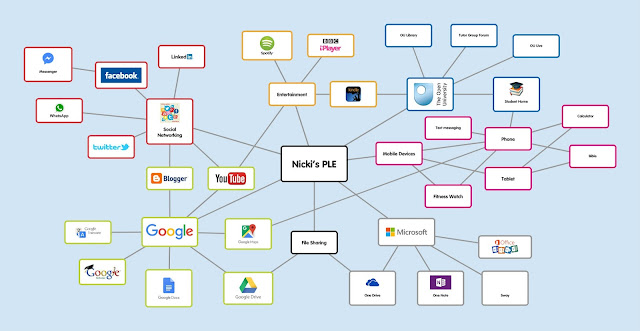
This tool is similar to Padlet in some ways. It's a mindmapping tool. I used it to create a visual representation of my Personal Learning Environment, which looks like this... If you've never used it before, why not give it a go. You need to register but it's free to use.   Getting started When you first log in, you arrive at your home page, which shows you all your existing Popplets. You can also see loads of public ones and some of them are quite interesting. Click on 'make new popplet' and then this screen will pop up. Give your popplet a name. Hopefully you will be a little more adventurous than me. Also pick a background screen colour. I picked pink. It is very pink. I'd better start filling it with new popples. Just click on the screen and a popple will appear. Adding Popples You can type in your popples and change the font size. You can also change the colours of the outline boxes like this... Adding Images/Video Yo...

Padlet

Image
I can't remember when I discovered Padlet but it has rapidly become one of my favourite tools for planning, thinking, mind-mapping, or whatever you prefer to call that. So here's a quick overview of Padlet and how to use it. Getting started Like most other free tools, you need to create an account and log in to create and access all your stuff. Then start creating. There are several different layouts, so have a play with them to see what you like.I find some better for certain tasks than others. In the top right corner, click on this sign to start a new Padlet. Then choose your template... My favourites are Canvas for mind-mapping and Shelf for categorising things. Then, you need to go through this set up guide. It appears on the right side of your screen. Depending on your choices, it can be really quick or quite laborious but when you've done, it will all look really good. If you want to change settings later, you can. I generally go for a calm, unclut...

Reading, PDFs and Notetaking

Image
I was going to talk about discussion forums today, as they are my other chosen technology for this all important EMA. However, when I started studying this morning, I realised that there is something very simple that my studying could not survive without. Fellow students on Facebook groups often ask whether we prefer to read course materials on paper or on the screen and how we take notes. So that's where I'm going with this one. Let's start at the very beginning... (cue for a song). When I search for resources online, I'm really hoping to find PDFs. Fortunately, most articles are available in PDF (Portable Document Format) and can be downloaded and saved as such. So I save it to my One Drive, using an easy to find file name: the author's surname, the year of publication and the first few words of the title. This not only makes it easy to locate, but it gives me a head start when writing my reference list too. I prefer to read on-screen, with SS over...

Twitter

Image
I'll start with Twitter, as it's one of my two chosen technologies to write about in my End of Module Assignment (EMA). There are many ways that Twitter can be used for learning but I'm going to focus on two that particularly work for me. Professional Development I follow quite a range of other teachers, e-learning specialists, FE organisations, MAODE students, etc. They post, with varying frequency, links to blogs, articles, interesting diagrams and infographics, some of which I find really useful. Of course, I also follow family members, a few friends (though not many) and other things that interest me, such as church stuff, disability stuff and exercise stuff. So, to help me to just see what's relevant, when I want to catch up on Ed-tech, I have a list of 56 people and organisations that I have grouped into a Twitter list . When I find something that is useful, I ' like ' it, so that the original poster knows it's been well-received and, if I think ...

Welcome to 'Finnberry Does Ed Tech'

Image
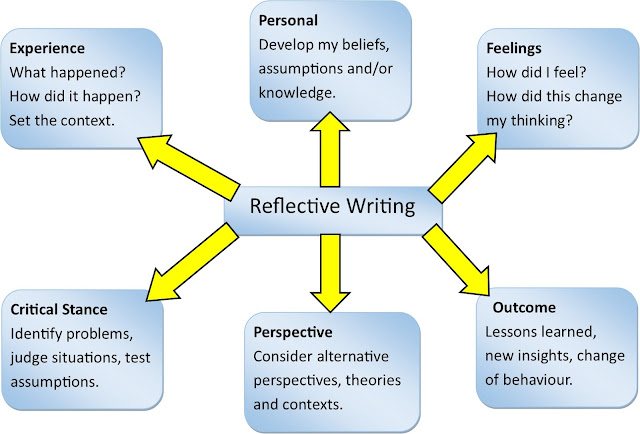
I wouldn't describe myself as an avid blogger but I do like to pour out my thoughts and share them with the entire world from time to time. I started blogging in 2008, just before we moved to Finland. It was a good way of recording an exciting time of our lives but it also provided a reflective tool and I think that's what got me into blogging as a long-term thing. Since then, I've blogged as part of my course work and I still have my main personal blog about wheelchair use and disability. Now, I'm starting this one and it's more about putting myself out there as an e-learning professional, building my network and having the potential to create a portfolio of my work. Reflection is my starting point. Way back in 2015, when I started studying a module called The Networked Practitioner , I had a bit of a think about reflective writing and I came up with this little picture to remind me what it's all about. I have it on the wall just above my monitor and I look a...